Plan the session. Run the room.
Get paid without chasing.
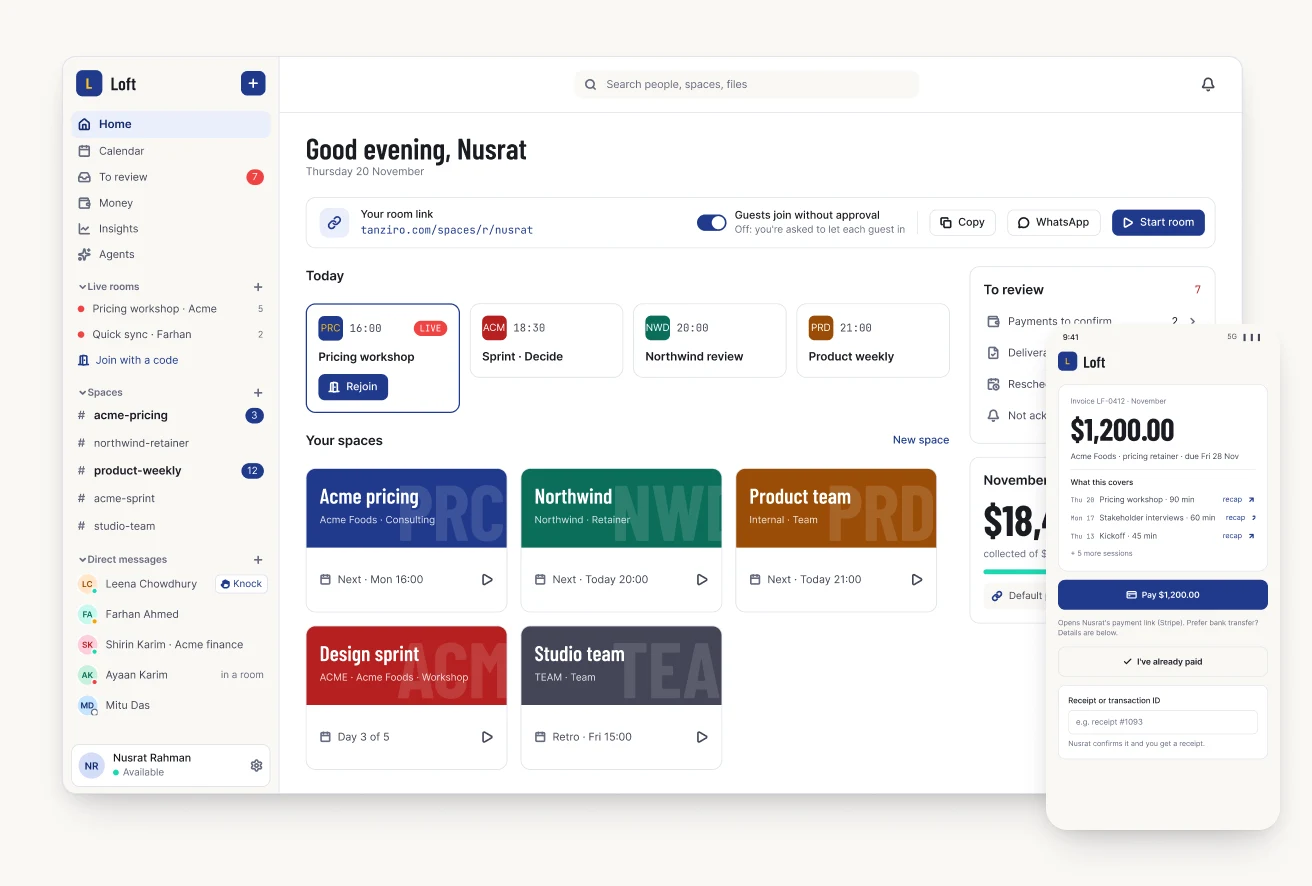
loft is a free workspace for small teams who run things live: client calls, workshops, classes and team meetings. A shared board that opens your files, chat with whoever is online, built-in audio, a space for every group, and invoices where every line links to the session it pays for.
have an account? sign in to your spaces →advanced: /spaces/new
no credit card · up to 12 people per room · guests join with a link
Let Claude or Codex do the prep.
You run the room.
Give your agent one link. It picks up the prep for your next session, builds plans, boards and checks as drafts, and asks you when it's stuck. You approve what you like and walk in ready.
- 01
Give it one link
Paste the agent link and one line into Claude Code, Codex or any agent that can read a URL.
tanziro.com/spaces/a/9k2m…x7> Get things ready through this link, top to bottom.scopeAcme pricing sprint - 02
It claims the prep
Tasks you queue, like 'plan Thursday' or 'turn this PDF into a board', get claimed one by one.
Agenda for Thu 15:00claude · claimedBoard from the briefcodex · working5-question check— · queued - 03
It drafts in the room
Plans, board pages, shapes, connectors and checks appear as dashed drafts while you watch.
MapDecideStoryboarddraft · by claude - 04
You approve, then run it
Accept everything, keep some, or reply with changes. Nothing goes to your group until you say so.
6 drafts ready for youAgenda · 5 blocksBoard · 3 sectionsCheck · 5 questionsaccept allask for changes
- drafts only
- can't send, invite or charge
- asks when stuck, then moves on
- no audio, no seat taken
- link expires in 30 days
- revoke any agent in one tap
01 · rooms
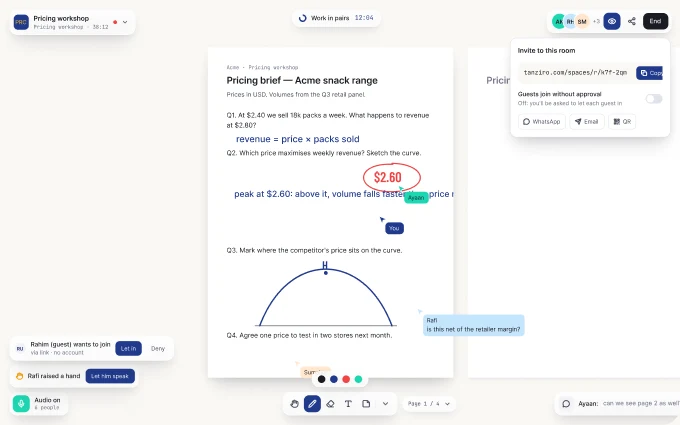
Open a room. Anyone joins with a link.
A board, chat and audio in one tab. Share the link anywhere, and clients, teammates or students join from a phone without making an account.
- live cursors with names, so you see who is writing where
- follow-me and lock keep everyone on your page
- guest join on: they walk in. off: you let each one in
- your own Meet or Zoom link still works as a fallback
start room → copy link → paste in WhatsApp → guest taps it → you tap let in → same page, same voice
vs Meet: Meet shares your screen. loft shares the page, and everyone can write on it.
02 · diagrams
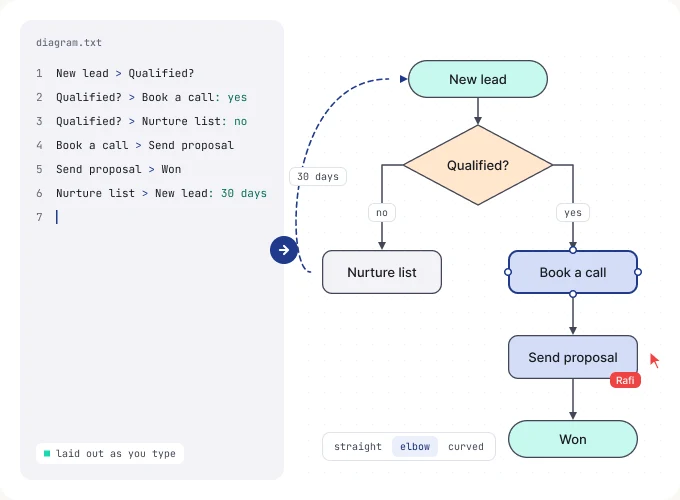
Draw it by hand. Or type it.
A whiteboard that behaves like a diagram tool. Flowchart shapes, connectors that snap and re-route, sections and sticky notes. Or type a few lines and get a tidy diagram you can still drag around.
- connectors snap to shapes and follow them when moved: straight, elbow or curved
- smoothed pen strokes; a rough box or circle becomes a clean shape
- diagram as code for flowcharts, sequence diagrams, ERDs and swimlanes
- workshop kit: dot voting, hide-and-reveal, shared timer, cursor chat
sketch or type → auto-layout → tidy up → present or export as PNG / PDF
it all runs in your browser: no plugin, nothing to install, nothing extra on the server.
03 · files
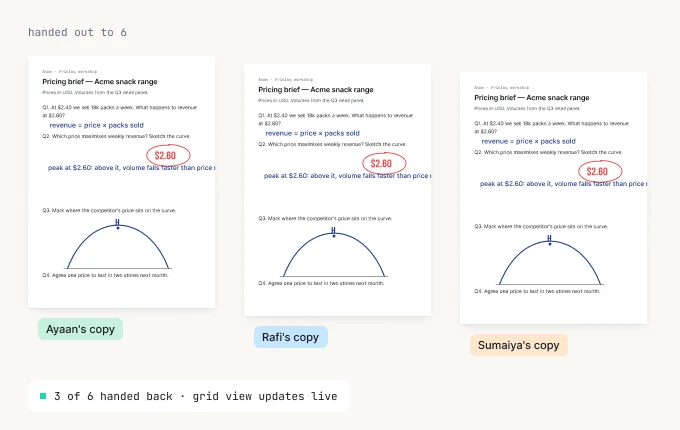
Drop a file. Give everyone their own copy.
PDFs, photos and slide decks become pages on the board. Your browser does the converting, so it runs on a $3 host and phones only load light images.
- PDFs and photos turn into pages you can mark up
- paste a public Google Slides or Docs link to import it
- hand out: everyone gets a private copy, you see them all
- the marked-up board is saved as a PDF in the space's files
drop brief.pdf → pages appear → hand out → each person works on a copy → copies come back to you
vs Miro: a great board. loft's board knows who is in the space and turns the page into follow-up work.
04 · calls
Audio that costs nothing. Video when it earns it.
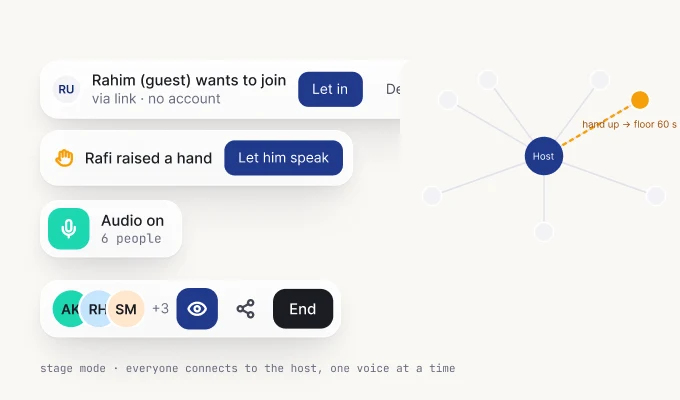
Calls are built in and audio comes first. Up to 6 people talk peer-to-peer for free. Groups of up to 12 use stage mode: one person speaks, the rest raise a hand.
- peer-to-peer audio for up to 6 talking, free
- stage mode: hands up, the host gives a 60-second turn
- bigger event? use your Zoom or Meet link for the call
- a daily budget steps video down to audio, never cuts a session
hand up → host taps let them speak → 60 s on the floor → mic goes back
vs Zoom: Zoom is a call with a whiteboard attached. loft is a workspace with a call attached.
05 · hallway
See who's around. Pull them into a room.
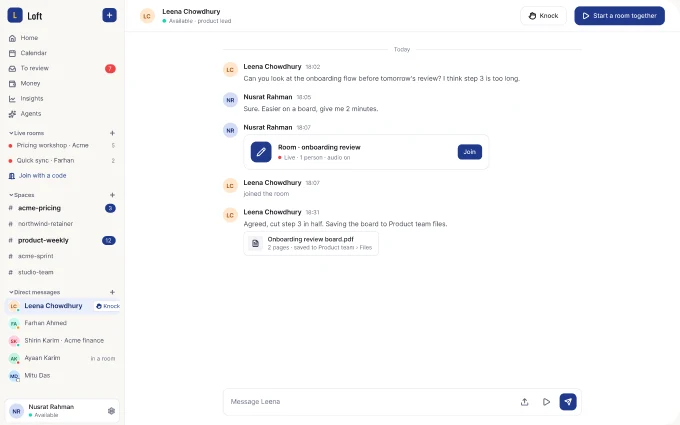
A Slack-style side panel shows live rooms, your spaces as channels, and direct messages with who is online. Talking and working happen in the same place.
- live rooms with one-click join, or start a new one
- knock on anyone who is free; they land on your board
- room invites arrive as cards in the chat
- clients and guests chat free, only in their own spaces
Leena is free → knock → she taps join → you're both on the board, audio on
vs Slack: Slack is where work gets talked about. In loft the talk sits next to the board, the session and the bill.
06 · spaces
A stream people actually read.
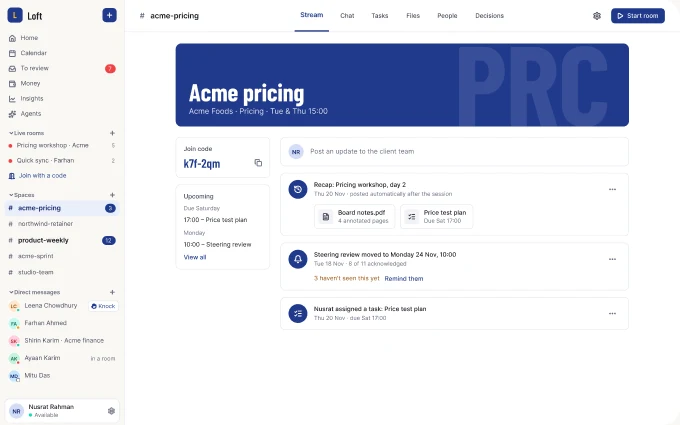
Every space, whether a client, a class or a team, gets familiar tabs: Stream, Chat, Work, Files, People and Progress. The difference is what lands in the stream on its own.
- recaps post themselves after each session, with the board as a PDF
- must-acknowledge posts show exactly who hasn't seen them
- files sorted by topic, with who opened what
- tasks, quizzes and sign-offs, joined with a code or link
end session → recap, board PDF and follow-ups post to the stream → everyone in the space sees it
vs Google Classroom: Classroom stops at the assignment. loft also runs the live session and sends the invoice.
07 · agendas
Write the agenda once. It runs the session.
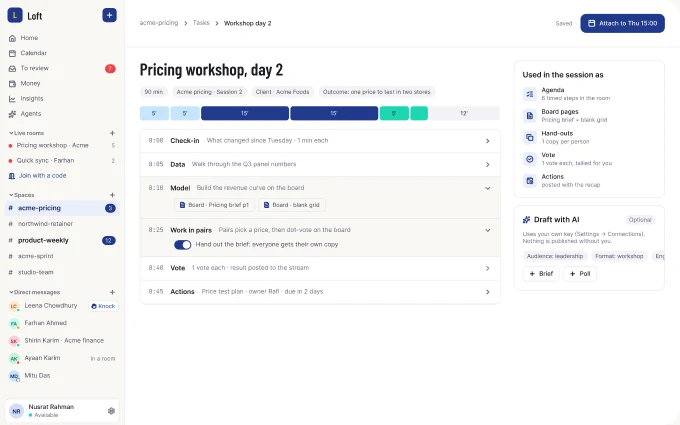
A plan has timed sections. In the room they become the agenda timer, the pages on the board, the hand-outs, the closing check and the follow-up work.
- a pacing bar shows where the hour goes
- attach a plan to a session and the room is ready
- templates for lessons, sprints, retros and client reviews
- optional AI with your own key drafts the first version
agenda → attach to Monday 16:00 → start room → timer, pages and hand-outs are already there
vs docs and AI planners: they write good plans. loft's plan becomes the live agenda, the board and the follow-up.
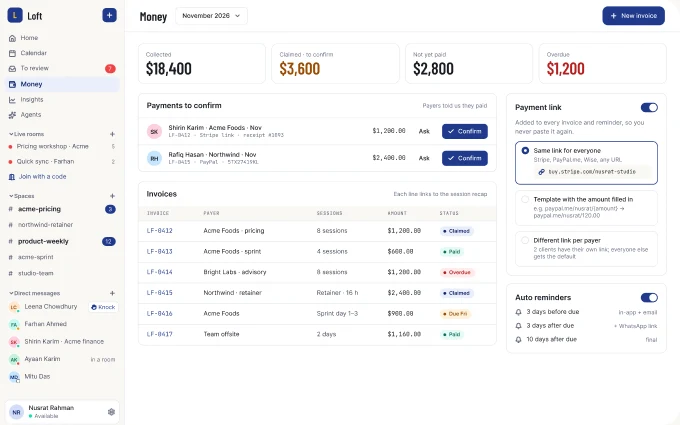
08 · money
Invoices that explain themselves.
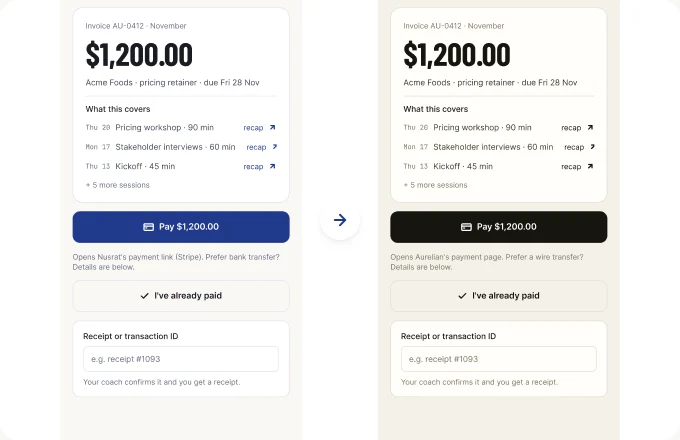
loft counts the sessions that happened and drafts the invoice. Every line links to its recap, and your payment link is attached for you, so you never paste it again.
- one default link, a link per payer, or a {amount} template
- per session, monthly, packages, retainers and fixed fees
- payers tap “I've paid” and you confirm with one tap
- reminders 3 days before and after the due date, in USD
session ends → line added → invoice on the 1st → client pays with your link → taps I've paid → you confirm → receipt
vs invoicing apps: they bill well but never see the work. loft's invoice shows what each line paid for.
09 · insights
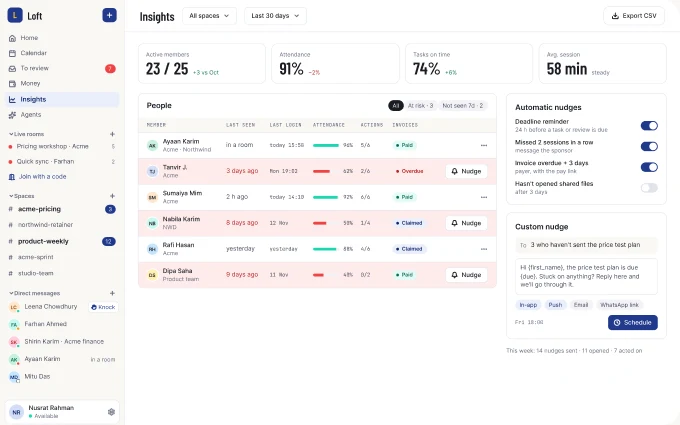
Know who is drifting before they leave.
Last seen, last login, attendance, open tasks and payments for everyone in a space, with the people at risk at the top and a nudge one tap away.
- reminders go out 24 hours before something is due
- missed two sessions? the right person hears about it
- write a custom nudge to a group and schedule it
- in-app and push first, email or a WhatsApp link as backup
3 haven't replied → custom nudge → Friday 18:00 → 2 respond by Saturday
vs spreadsheets: a sheet tells you who paid. loft tells you who is drifting and lets you act on it.
10 · checks
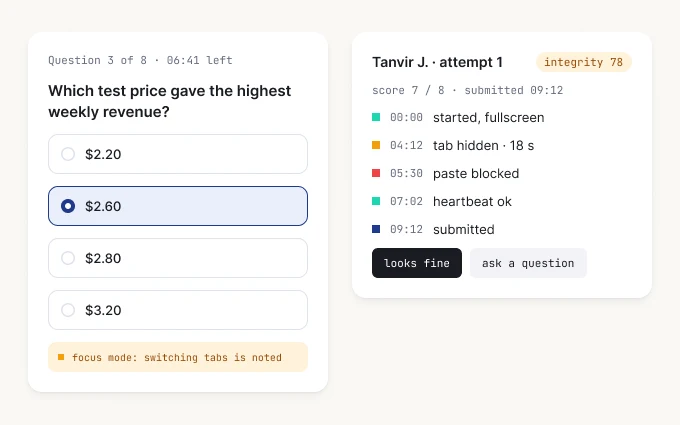
Quick checks with integrity signals. No webcam.
Quizzes, polls and sign-off checks grade themselves. For checks that matter, a 6 KB script records tab switches, pasting and leaving fullscreen, and gives you a score to review, not a verdict.
- multiple choice, true/false and short answers, auto-graded
- time limits and attempts enforced on the server
- an event timeline per attempt, flagged for a human look
- no camera, no microphone, nothing to install
switches tab at 04:12 → event logged → score 78 → you review the timeline
vs proctoring suites: they watch the person. loft watches the browser, and leaves the judgement to you.
11 · phones
Built for a phone on patchy data.
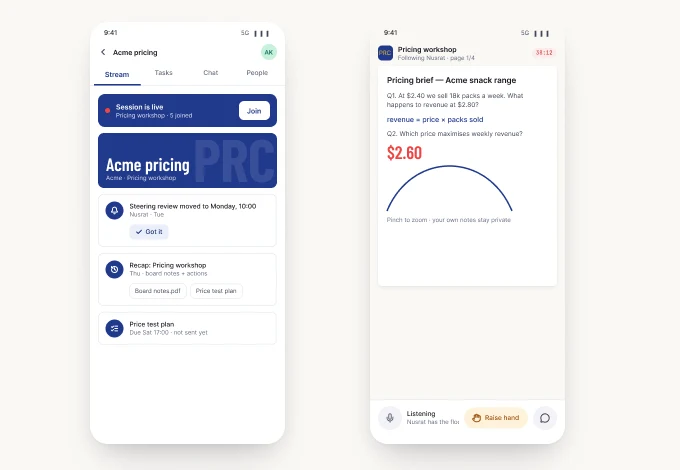
People join from a phone, audio-only if the network is weak. Pages arrive as light images, the app installs from the browser, and every screen works one-handed.
- one link to join, no app store, installs as an app
- audio-only mode for slow connections
- raise a hand, follow the page, keep private notes
- clients pay and check progress from the same phone
tap the link → audio connects → follow the board → raise a hand
vs Meet on a phone: a shared screen is too small to read. loft sends the page itself, so it fits.
Built like a tool you own
Free
Every host, member and guest. Organisations pay only to put their own brand on it.
Small on purpose
Rooms hold up to 12 people and calls work best with up to 6 talking. Staying small is what keeps loft fast and free on simple hosting.
Optional everything
Calls, email, AI and payment links are switches in the dashboard. It works with all of them off.
Calm
A side panel for people and rooms, one card per space, and a board with chat tucked away.
for schools & organisations
Put your name on every screen.
loft stays free. A branded plan swaps in your logo, colours and name everywhere people see it, so members and payers only ever see you.
- your own link: tanziro.com/spaces/your-name
- sign-in, room links and the side panel in your colours
- invoices, receipts and certificates on your letterhead
- emails and WhatsApp messages sent in your name
How loft is different
Most tools do one of these well. loft puts them in one place for small teams, shared by hosts, members and guests.
| Feature | loft | classroom | slack | zoom | miro | billing apps |
|---|---|---|---|---|---|---|
| Shared board that opens your PDFs and slides | — | — | partly | — | ||
| Flowcharts with connectors that snap and re-route | — | — | partly | — | ||
| Type a diagram as text: flowcharts, sequences, ERDs | — | — | — | partly | — | |
| Workshop kit: dot voting, timer, hide-and-reveal | — | — | partly | — | ||
| Guests join from a link, no account | — | partly | partly | — | ||
| Calls built in, free for small groups | partly | partly | partly | partly | — | |
| Chat with whoever is online, rooms one click away | — | partly | — | — | ||
| Stream, files and must-acknowledge posts | partly | partly | — | — | — | |
| An agenda that runs the live session | — | — | — | partly | — | |
| Invoices linked to sessions, with your own pay link | — | — | — | — | partly | |
| Activity insights and nudges | partly | partly | partly | — | partly | |
| Free for every host, member and guest | — | — | — | — | — |
yes partly = paid tier, add-on or workaround — = no. Based on each product's public feature pages, Nov 2026.
Questions
Is it really free?
Yes, for every host, member and guest. Schools and organisations pay only if they want their own logo, colours and name on it.
Do I still need Zoom or Meet?
No. Audio is built in and free for small groups. Keep your own link as a fallback, or switch on video when you need it.
Can people join without an account?
Yes, from a link. Turn guest join off and you'll be asked to let each person in.
How do I get paid?
Through your own payment link: Stripe, PayPal, Wise or any URL. loft never touches the money; it drafts the invoice and keeps track.
Where is my data?
At tanziro.com/spaces, in one database on our server. Export everything any time.
What can I run on it?
Client calls, workshops, classes, coaching and team rituals. Each space picks a mode, which only changes the labels and templates.
How many people can join?
Up to 12 in a room at once, and calls are smoothest with up to 6 talking. loft is made for small teams and small groups, not webinars.
What if a session is bigger?
Use your Zoom or Meet link for the call and keep loft for the board, the plan and the invoice. Organisations can also add their own video provider.
Open your first room.
Free at tanziro.com/spaces for small teams: up to 12 people per room. No card, no setup.